Tuesday, July 16, 2013

FInally.io does a cannonball into the cloud-server monitoring pool [feedly]

Another cloud monitoring service for me to check out. 
 
 
Shared via feedly // published on Cloud // visit site
FInally.io does a cannonball into the cloud-server monitoring pool

Deploying in the cloud can cut the cost of on-premise gear and the number of employees needed to tend to it, but maintaining compute and storage resources on, say, Amazon Web Services can get tedious and pricey. Several startups have emerged to solve those problems. A new one sees a niche in helping busy or less savvy devops people discover when issues arise.

In the past couple of months, Finally.io has given beta users a tool for issuing alerts when errors pop up on AWS specifically, for EC2, its Elastic Block Store, DynamoDB and other services.

The program has helped some beta users by pointing out when performance was lagging when instances of AWS' Relational Database Service started calling on disk instead of just copying data to memory, said Ryan Gotszling, the company's CEO and co-founder. That information can be valuable because AWS customers can then decide to add instances in order to improve performance.

Finally.io has just added support for New Relic. It plans to support for Infrastructure-as-a-Service (IaaS) vendors in addition to AWS later this year, said Gotszling, who was the first employee at About.me (see disclosure) before it was acquired and later spun off by AOL.

About.me bought itself back from AOL earlier this year, and that gave Gotszling a chance to pursue other opportunities. He and co-founder Alex Bendig, another early About.me employee, had both dealt with the failure of cloud infrastructure and used monitoring tools for it, and they decided to go after solving problems existing services didn't address. Hence the rise of Finally.io.

The service will need to stand out from other tools for monitoring servers and cloud deployments, such as Boundary, Cloudyn, Newvem, Scalr and Server Density.

What makes Finally.io stand out is that it doesn't bother to tell you about the things that don't really matter. As soon as a company puts it to work, it starts evaluating the historical performance of a deployment — for now, thanks to AWS' Cloudwatch API — to get a sense of what's normal and what's not. As a result, Finally.io won't surface problems that are rare for most people running cloud servers but are constant little occurrences for the a customer. And it goes the other way, too — one company in the cloud might make a big deal out of what is typically a little hiccup for nearly everyone else, and that might prompt an alert on Finally.io.

finally.io screenshot

Alerts show up on a web dashboard and arrive via email, although texts could be an option going forward, Gotszling said.

He and Bendig are thinking about adding the ability to just press a button on the dashboard and have Finally.io go to work solving problems, like restarting a server that went down. But implementing that functionality could be tricky, as not every developer realizes the consequences of such serious actions. "We are a little afraid of that risk — 'I know I told you to do it, but I didn't know it was actually going to restart the server,'" Gotszling said.

And so for now IT makes suggestions about what to do, and a user can check a box next to a recommendation and have the text struck out. That way, it's on cloud users themselves to take action.

The service is free for now, while it's in public beta. Premium service will follow in the ensuing months, in relation to how large of an infrastructure footprint users want to manage, Gotszling said.

Disclosure: About.me is backed by True Ventures, a venture capital firm that is an investor in the parent company of GigaOM/paidContent. Om Malik, founder of GigaOM, is also a venture partner at True.

Related research and analysis from GigaOM Pro:
Subscriber content. Sign up for a free trial.


The Go-Anywhere Workspace [feedly]

I like a tidy desk and keeping things simple. must look at mobile hotspots. new to me.
 
 
Shared via feedly // published on Lifehacker // visit site
The Go-Anywhere Workspace

The Go-Anywhere Workspace

We tend to look at workspaces as places with desks and decoration. At least, that's what we normally post about. When you need to work, however, a distilled toolset often matters more than the space around you. After all, when you can move you can change that space whenever you like.

Read more...


Run a Windows Service from Visual Studio [feedly]

Windows based DevOps. Just the ticket. even though I use a mac we are essentially a windows shop so this is good stuff.
 
 
Shared via feedly // published on DevOps On Windows // visit site
Run a Windows Service from Visual Studio

This is part of a series on creating and installing Windows services.

  1. How to Create a Windows Service
  2. How to Install a Windows Service
  3. How to Run a Windows Service from Visual Studio

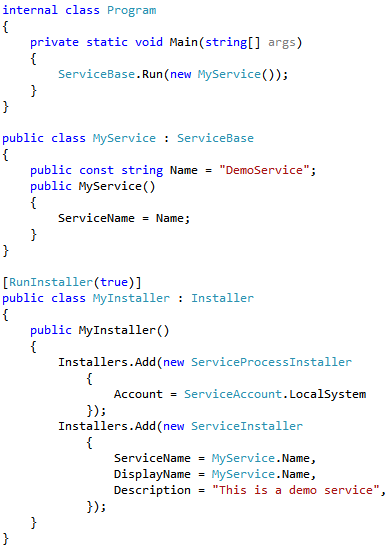
So far, we have learned how to create a basic shell for a Windows service and how to install it using both sc and InstallUtil. Currently, the code for our simple demo service looks like this:

runFromConsoleStartPoint

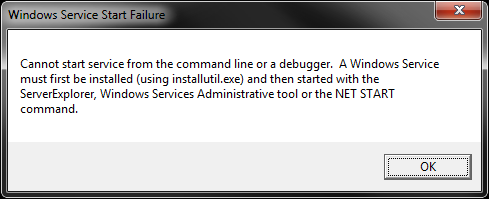
As we saw in our first episode, if we simply run this application from Visual Studio (perhaps via the F5 key), we are met with this error message informing us that we cannot run the service from the command line or debugger:

NoServicesFromConsole

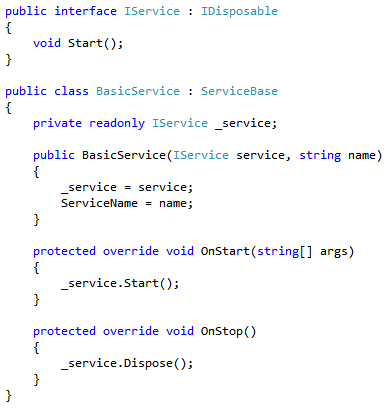
If we want to be able to efficiently develop our service from Visual Studio, it sure would be nice if we could actually run (and/or debug) it from Visual Studio. To begin, we need to abstract MyService away from the fact that is running via an implementation of ServiceBase. To do so, we will create a new reusable implementation of ServiceBase, called BasicService:

BasicService

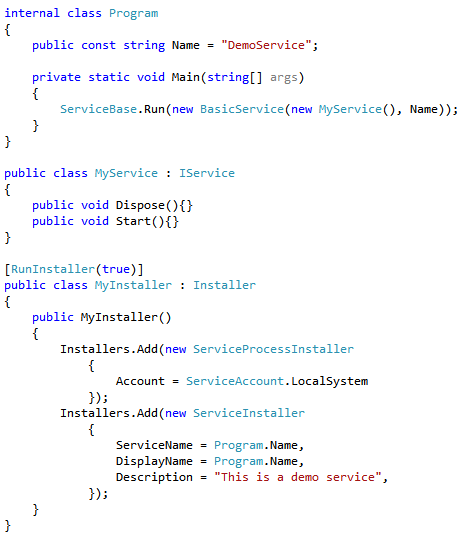
Note that BasicService overrides the two critical methods on ServiceBase, OnStart and OnStop, which are called when the service is commanded to start and stop by the service control manager. BasicService delegates those calls to a collaborating interface, IService. In order to convert our existing service to use this new infrastructure, we must change MyService to implement IService, and slightly modify our Main method:

useBasicService

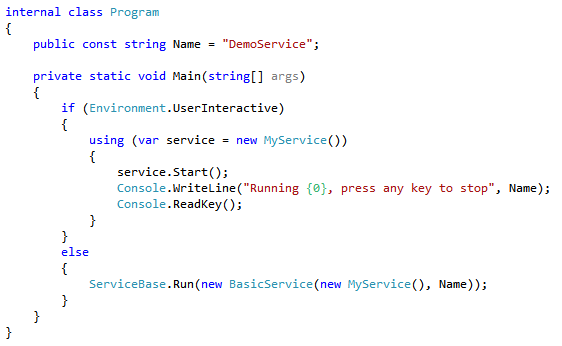
Now that the "complex business logic" of our application (yes, I know it still doesn't do anything) is abstracted away from the fact that it will run via a service, we are free to run it another way. Utilizing Environment.UserInteractive, we can modify the main method to turn our application into a hybrid console/service application:

runAsConsoleMainMethod

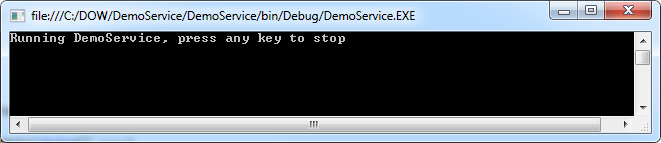
Running the application no longer throws up an error!

runAsConsoleInteractive

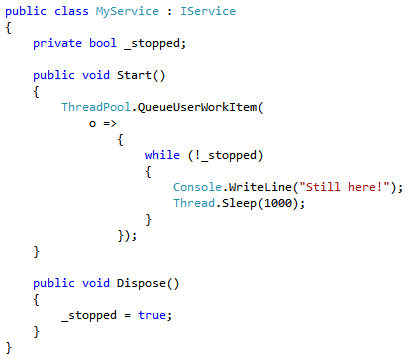
Since I did promise that we would have the service actually do something this time, let's build out MyService a bit:

serviceDoesSomething

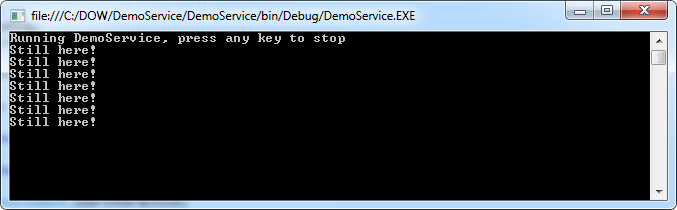
The service will simply write a message to the console every second until we stop it. And because of our changes today, we can easily verify that by hitting F5:

serviceDoesSomethingConsole

Note that it is also possible to run the service by calling the executable from an interactive command line or by double-clicking it in Windows Explorer. These approaches also trigger the "run as a console app" branch in our main method. With just a little bit of additional code, we have made it much easier to develop and debug our service.

Run a Windows Service from Visual Studio is a post from: DevOps On Windows - Be awesome at Windows DevOps or Windows Sysadmin

The post Run a Windows Service from Visual Studio appeared first on DevOps On Windows.


Use Google as a Proxy Server to Bypass Paywalls and Other Blocks [feedly]

A cheeky little trick this, not too much use as I decide who can view what in our office (everything and anything they want. blocking facebook not a smart move if you integrate with the api they provide and anyway why make people unhappy).
 
 
Shared via feedly // published on Lifehacker // visit site
Use Google as a Proxy Server to Bypass Paywalls and Other Blocks

Use Google as a Proxy Server to Bypass Paywalls and Other Blocks

Whether you work at a place that blocks a bunch of web sites, or you can't access a page because it's behind a paywall, tech blog Digital Inspiration shows you how to use a couple Google proxy servers to get around those restrictions.

Read more...


A Solution for the Mother Ducking Shotty iPhone AutoCorrections of Colorful Words [feedly]

At last I can ducking swear like a cant as often as I fudging like once I've followed these instructions. clever mother funsters!
 
 
Shared via feedly // published on OS X Daily // visit site
A Solution for the Mother Ducking Shotty iPhone AutoCorrections of Colorful Words

The iPhone autocorrect feature is fairly aggressive with certain words and phrases. Though you can persistently cancel out the corrections to teach autocorrect what you actually meant to type, you still might find particularly colorful words are continuously autocorrected to much friendlier variations, often involving animals, which if you're trying to sound a certain way can really take the oomph out of your intended words.

Look at this mother ducker

If you really want to use certain words without the unintentional autocorrection, a solution of some sort is to use the keyboard replacement shortcuts feature to instantly swap a shortcut for another phrase. This will overcome the iOS dictionary preference for having a clean mouth, letting you be as filthy as you need to be.

In this case, we'll replace that universally amusing and loved/hated "ducker" auto replacement with the "fudger" word that was actually intended (stick with the fudge or go with your more colorful preferred variation that we won't print here).

  • Open Settings and go to "Keyboard", scroll down to "Shortcuts" and choose "Add New Shortcut…"
  • In the "Phrase" section, put the word you actually meant to type (you meant "fudging", right?)
  • In the "Shortcut" section, put the word persistently autocorrected, like "ducking"
  • Choose "Save" and head to any text entry field, type out the original "ducking" word as intended and watch it replace itself with "fudging"

Ducking Autocorrect fix

Add additional shortcuts for more of your colorful autocorrection as needed, whether it's something "shotty" or a total "bass whole".

Speaking of autocorrect, if you have persistently corrected errors or now have totally erroneous autocorrections, you can always reset the dictionary and start from scratch.

Thanks to Max for sending in the tip idea


What's a Better Domain Name for Personal Branding? [feedly]

Don't think I'll get johnsmith.com !
 
 
Shared via feedly // published on Lifehacker // visit site
What's a Better Domain Name for Personal Branding?

What's a Better Domain Name for Personal Branding?

When it comes to personal branding, having your own domain name is an important component. Unless you have an uncommon last name, though, the chances are that yourlastname.com is long gone. There are other top level domains, like .me and .name, but is it better to go with one of those or stick with .com?

Read more...


Monday, July 15, 2013

AWS Week in Review - July 8, 2013 [feedly]

Main highlight here is a massive reduction again in EC2 charges.
 
 
Shared via feedly // published on Amazon Web Services Blog // visit site
AWS Week in Review - July 8, 2013

Let's take a quick look at what happened in AWS-land last week:

Monday, July 8
Tuesday, July 9
Wednesday, July 10
Thursday, July 11
Friday, July 12

Stay tuned for next week! In the meantime, follow me on Twitter and .

-- Jeff;


CodeStock 2013 Wrap-up [feedly]

CodeStock presentation about asp.net and testing using the good chaps at app harbour and their plugin Eco system.
 
 
Shared via feedly // published on try-catch-FAIL // visit site
CodeStock 2013 Wrap-up

I had a blast at CodeStock 2013 this past weekend. I met a lot of cool people, attended some great sessions, and got to hang out with some good friends.

I presented two sessions this year. "Testing Everything for ASP.NET MVC Applications" illustrated three types of testing using three different frameworks. This was indeed a fast-paced talk. In hindsight, I think I covered way too much material for a 70 minute presentation, but hopefully I succeeded in covering the main points of each framework.

"ASP.NET MVC in the Cloud with AppHarbor" took a simple ticketing system into the cloud by using a variety of AppHarbor add-on services. We also learned that Commander Riker does not sit down like a normal man. I very much enjoyed presenting this session.

Both presentations used the same sample application. You can find the slides from the presentations here, and the code for the Heroic Support sample application here. If you'd like to see these presentations, let me know. I may break these sessions down and present them via YouTube at a later date. 


Facetune Touches Up Portraits with Powerful Tools and Filters [feedly]

It will have it's work cut out with me!
 
 
Shared via feedly // published on Lifehacker // visit site
Facetune Touches Up Portraits with Powerful Tools and Filters

Facetune Touches Up Portraits with Powerful Tools and Filters

iPhone: You don't need to touch up your selfies in Photoshop before posting them to Facebook; Facetune is a powerful portrait editor that can tackle just about any issues with a portrait right on your phone.

Read more...


Keep a Garbage Bag In Your Laptop Bag for Sudden Rain Storms [feedly]

A perfect little lifehack for when the current heatwave ends and the rain comes again. I keep carrier bags rolled up rather than a big refuse sack but that's a better option.
 
 
Shared via feedly // published on Lifehacker // visit site
Keep a Garbage Bag In Your Laptop Bag for Sudden Rain Storms

Keep a Garbage Bag In Your Laptop Bag for Sudden Rain Storms

If you keep your gadgets and gear in a canvas bag or backpack, they won't be very safe when you're caught in a sudden rain storm. You can prepare for this emergency ahead of time though by keeping a plastic trash bag tucked away at the bottom of your bag.

Read more...