Monday, July 15, 2013

Facetune Touches Up Portraits with Powerful Tools and Filters [feedly]

It will have it's work cut out with me!
 
 
Shared via feedly // published on Lifehacker // visit site
Facetune Touches Up Portraits with Powerful Tools and Filters

Facetune Touches Up Portraits with Powerful Tools and Filters

iPhone: You don't need to touch up your selfies in Photoshop before posting them to Facebook; Facetune is a powerful portrait editor that can tackle just about any issues with a portrait right on your phone.

Read more...


Keep a Garbage Bag In Your Laptop Bag for Sudden Rain Storms [feedly]

A perfect little lifehack for when the current heatwave ends and the rain comes again. I keep carrier bags rolled up rather than a big refuse sack but that's a better option.
 
 
Shared via feedly // published on Lifehacker // visit site
Keep a Garbage Bag In Your Laptop Bag for Sudden Rain Storms

Keep a Garbage Bag In Your Laptop Bag for Sudden Rain Storms

If you keep your gadgets and gear in a canvas bag or backpack, they won't be very safe when you're caught in a sudden rain storm. You can prepare for this emergency ahead of time though by keeping a plastic trash bag tucked away at the bottom of your bag.

Read more...


Sunday, July 14, 2013

Planning Octopus 2.0 [feedly]

I'm a very happy user of Octopus Deploy along with TeamCity to provide continuous delivery of our application. Deploying new versions and bug fixes to our application isn't a stress or worry or one other variable to think about.

Really looking forward to the API to automate the few things that are left to automate and I'm looking at various API's for best practices at the moment and I like not having IIS as a dependancy. Unit testing a good plus too.

Well done Paul on a great product and blog.  
 
 
Shared via feedly // published on Octopus Deploy // visit site
Planning Octopus 2.0

When a product or technology is introduced, it starts out feeling fresh and innovative. Over time, it finds a market and starts to spread. Eventually, everyone you know is using it. And then, eventually, it starts to fade away. The Diffusion of Innovations theory provides a way of understanding this process, and it is often illustrated as a bell curve:
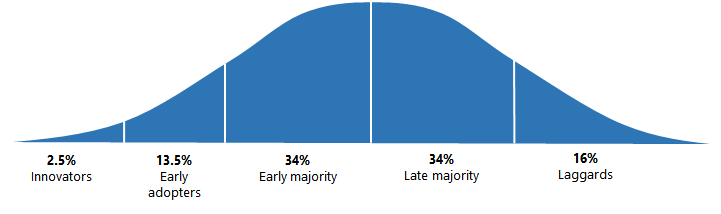
Diffusion of innovations

In our industry this whole lifecycle may only take a few years. Right now, Octopus Deploy is finding its market among those innovators and early adopters. In fact, we were recently added to the ThoughtWorks Technology Radar in the Assess category:

Tools like Chef and Puppet are increasing their support, but there are also Windows specific solutions being developed like Octopus. Octopus allows automated deployment of your ASP.NET applications and Windows services and decreases dependency on PowerShell. It can be used with both NuGet using Octopak and TeamCity to create a full build, package, and deployment pipeline.

When Octopus Deploy 1.0 was first released we had a pretty basic feature set - we could download a NuGet package, and push it to a remote agent, and run PowerShell scripts with some very basic configuration support. Since then we've added:

When we first shipped, I expected Octopus Deploy to be used by customers with a handful of projects, deploying them to a dozen or so machines. I figured that banks and the fortune 500 wouldn't go near it. In reality, we have customers using Octopus to deploy over 200 projects to 300+ machines, and is being used by some pretty recognizable brands. People aren't just trialing it, they are seriously committing to it.

We've also learned a lot about the trade-offs and limitations of our current architecture and ways it could be improved. There are features that we'd love to add that just aren't possible without revisiting large parts of the application.

What is a 2.0?

At this point, there's a temptation to just stick with the current architecture. It may not be perfect, but it's working. We could add a few small features here and there and call it version 2.0, without doing anything too significant or risky. Then we'd switch to marketing mode and hope that the Diffusion of Innovations model takes its course, and we grow without doing much more work. And, eventually, someone else would come up with a better product and we'd fade away.

I think we can do better.

We're not going to go so far as to completely rewrite everything, as that would be a bad idea. But at the same time, 2.0 is going to be different. 1.0 was a great way to learn more about the problems we're trying to solve with Octopus, and 2.0 is where we'll apply those lessons. Octopus 2.0 will be the product someone else would have built.

However there's an equal temptation to fall into the trap of second system effect:

As he designs the first work, frill after frill and embellishment after embellishment occur to him. These get stored away to be used 'next time.' Sooner or later the first system is finished, and the architect, with firm confidence and a demonstrated mastery of that class of systems, is ready to build a second system... The general tendency is to over-design the second system, using all the ideas and frills that were cautiously sidetracked on the first one.

Certainly when building Octopus 1.X there have been plenty "if we had only done this thing different, that thing would be way easier to add" moments. I'm hoping we'll be able to address some of those issues, but without going too far.

Big changes for 2.0

The biggest change we've made so far in 2.0 is to go HTTP API-first. Everything the server can do will be exposed via the REST API, and the web user interface is going to be built in JavaScript. There will also be a C# client library that you can use that provides a friendly wrapper over the REST API.

In fact, right now, Octopus 2.0 doesn't have much of a UI at all; I'm doing most of the work through an automated API test suite that I blogged about on my personal blog recently.
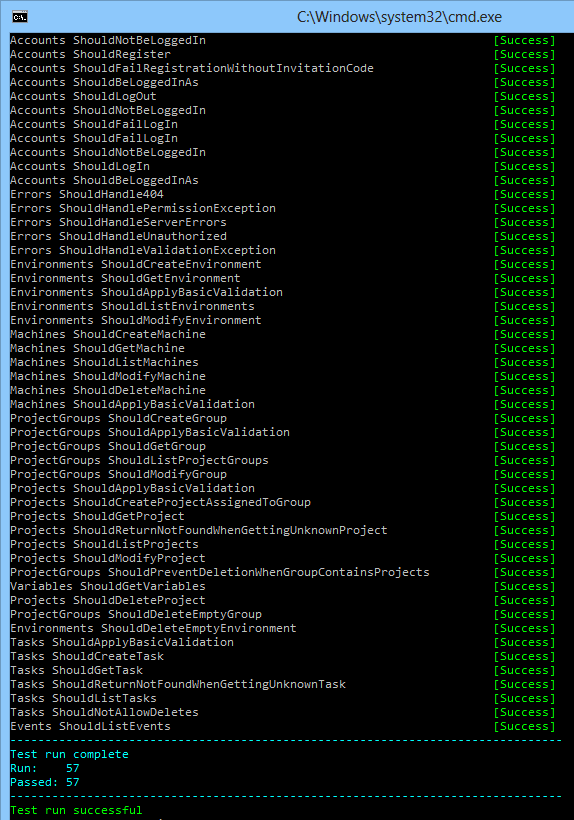
Octopus automated API tests

Since the web stack was being revisited, we even re-evaluated whether the Octopus 1.0 choice of ASP.NET MVC running on IIS was still valid. And it wasn't. Instead, Octopus 2.0 uses Nancy, self-hosted. When you install Octopus 2.0, there'll just be a Windows Service; there won't be an IIS application, and you won't need to install IIS on the Octopus server anymore. That also cuts out a whole bunch of support issues for us.

We're doing other things differently too. We're embracing eventual consistency, so everything feels really fast. And we're designing the new UI to work much better for very large amounts of projects, environments and machines.

We're also making some conceptual changes. These aren't just new features, but different ways of thinking about the world:

  • Instead of a project having a list of steps, projects have a deployment process that provides a lot more control about what to do on failure.
  • We're introducing support for multi-tenant deployments
  • You'll be able to create global variables, environment variables, and project group variables, all with multiple scoping options
  • We're going to be dealing with variable/step snapshots quite differently

I'll blog more details about these changes as we get further into building Octopus 2.0 and we have a better understanding of the changes.

When?!

When will it ship? Once we've made some more progress on the UI (the REST API is now looking pretty complete) we'll try to make beta downloads available for people who want to give it a try. I'm hoping we'll have something to release by the end of August/September, but we'll know more as we get closer to a beta release.


PDF4Kindle Converts PDF Files to Native Kindle Books [feedly]

Convert your PDF files to the native file format for reading on your Amazon Kindle.
 
 
Shared via feedly // published on Lifehacker // visit site
PDF4Kindle Converts PDF Files to Native Kindle Books 

PDF4Kindle Converts PDF Files to Native Kindle Books

I love reading on my Kindle, but the screen is just too small and blurry to be useful for PDF files. While it's lacking in customizability, PDF4Kindle solves this problem pretty well by converting PDF files into Amazon's native .mobi format, all while being completely web-based.

Read more...


Thursday, July 11, 2013

IFTTT goes mobile, wants to do your Internet heavy lifting for you [feedly]

Built a little prototype with this a little while ago to help automating bits of our stack. Didn't finish it of course but this might just jog me into finishing off!
 
 
Shared via feedly // published on iMore - The #1 iPhone, iPad, and iPod touch blog // visit site
IFTTT goes mobile, wants to do your Internet heavy lifting for you

IFTTT (If This Then That) has been trying to automate your Internet life via the browser for a while now, but the service has finally gone mobile with the launch of their first app for iPhone. In addition to the ton of services that IFTTT already supports, bringing it to the iPhone opens up three new channels for users, by allowing integration with the iOS Reminders app, as well as Contacts and Photos.

The basic premise behind IFTTT is creating simple 'recipes' as they call them, based on two sets of parameters to automate processes. For example, if I take a photo in Instagram, then upload that photo to my SkyDrive. Automation for the Internet, but without the scary parts. Each channel – of which there are many – has some preloaded recipes for you to put to work, but you can also create your own to suit your needs then share it with the world.

The app itself is pretty slick, and really nicely designed. I'm a new user of the service, so I popped a few test recipes in there to see what happened, and so far, so good. To put it to good work, I've asked it to upload my Instagram pictures to SkyDrive, which is working like a charm, and I've got a bunch of "Email me when..." circumstances that seem to be going well too. Give it a try by grabbing the iPhone app from the App Store now, and drop your favorite recipes into the comments below for us all to try!


Scalability Tips & Greatest Hits [feedly]

Always like a top 5 list. top 5 crisps. top 5 chocolate bars or indeed top 5 scalability tips.
 
 
Shared via feedly // published on Sean Hull's Scalable Startups // visit site
Scalability Tips & Greatest Hits

Read the original article at Scalability Tips & Greatest Hits

Join 8000 others and follow Sean Hull on twitter @hullsean. In the past two years we've written a ton of material on scalability. Here's the greatest hits… Why Generalists Are Better at Scaling the Web The internet stack is a complex infrastructure of interlocking components. An scalability engineer must be adept at Linux, plus webservers, [...]

For more articles like these go to Sean Hull's Scalable Startups Related posts:

  1. 5 Tips for Scalability
  2. The Most Important AWS Feature for Performance and Scalability
  3. Scalability Happiness – A Quiet Query Log
  4. Five More Things Deadly to Scalability
  5. 5 things toxic to scalability

Podcast: Puppet Enterprise 3.0 [feedly]

*really* must get myself learning puppet and chef.
 
 
Shared via feedly // published on Puppet Labs // visit site
Podcast: Puppet Enterprise 3.0

Puppet Enterprise 3.0 Podcast


Web API 2.0 Preview – Introducing Attribute Routing [feedly]

Worth a look but servicestack still ahead from what I've seen so far but I'm open minded about it.
 
 
Shared via feedly // published on DevCurry // visit site
Web API 2.0 Preview – Introducing Attribute Routing
Web API routing has been pretty flexible using the convention based routing and custom Route Templates. We could specify custom routes, but things got verbose and disconnected for situations where we had to define routes for sub-resources, like for example if you had a list of Books and each book had more than one author, to fetch the authors for a book, you might want a route like http://myapp/

OS X Mavericks Preview: Notifications [feedly]


Another reminder that OSX Mavericks is coming and no more cat based naming conventions for Apple's operating system. On the whole I'm glad I've moved away from Microsoft Windows especially seeing Windows 8 in operation. Looks an awful OS to use. 

I still have a Windows VM as development has stormed forward faster and nuget package restore, dotnetopenauth and some csproj file oddness preventing me from using Xamarin monodevelop. I do have a hg-flow branch spike to try and sort this out (mostly path errors where one OS uses forward slashes the other back slashes etc) but as ever it's finding time to sort it.
 
Shared via feedly // published on iMore - The #1 iPhone, iPad, and iPod touch blog // visit site
OS X Mavericks Preview: Notifications

OS X Mavericks Preview: Notifications

Up to now, OS X notifications have been a one-way street: They provide you with info about what's happening in applications, but offer no way to interact. Mavericks changes all that.

For years, Mac users who wanted to consolidate notifications from various applications had to rely on third-party apps like Growl to get the job done. That changed in 2012 when Apple rolled out Mountain Lion, which incorporated the iOS-like Notification Center for the first time.

But Apple's implementation of system-wide notifications was sorely lacking: while it provides you with regular status updates through pop up windows and collects them all in a sidebar you can view using a trackpad or mouse gesture, Mountain Lion notifications don't provide any sort of interactivity. So when a tweet comes your way you want to respond to, you still have to open your Twitter application and do it yourself.

Here's what Apple says about Notifications in Mavericks:

Notifications let you see what's up — and now they let you get things done, all without leaving the app you're in. With OS X Mavericks, you can interact with your notifications, so you can reply to a message, respond to a FaceTime video call, or delete an email right from a notification.

Mavericks is taking a big step in the right direction by offering one-click interactivity with notifications. Now when a notification pops up from e-mail, Messages or FaceTime, you can respond without breaking stride in whatever you're doing.

OS X Mavericks Preview: Notifications Facetime

Apple's doing more than that, however - they're bridging connectivity between iOS and OS X Mavericks. So if you have an app running on your iPhone, iPod touch or iPad that sends you Push Notifications, you can now get those Push Notifications on the Mac.

Notifications also rounds up your alerts when your Mac is asleep, so when you wake your computer you'll get a list of all notifications that have happened directly from your Lock Screen. If you're concerned about people spying stuff they shouldn't see from your Mac's Lock Screen, worry not. The Notifications system preference pane remains in place in Mavericks, now with additional features, like the ability to customize whether an app will show notifications when the display is asleep or locked.

OS X Mavericks Preview: Notifications Reply

At the WWDC keynote, Apple's senior vice president of Software Engineering Craig Federighi highlighted another feature of Mavericks Notifications - it will alert you to any software updates and download them in the background. That's a huge time saver to Mac users who want to stay up to date on system software changes, and a huge boon to frequent customers of the Mac App Store.

It's sadly easy to get distracted when you're trying to be productive, thanks to a million things happening at once - social media, applications demanding your attention and more. Mavericks Notifications goes a long way to reining this in by providing a consistent and easy-to-use way to stay on top of what's happening without removing your attention from the task at hand.

Is OS X Mountain Lion's Notification Center driving you crazy? Have you resorted to third-party utilities to bridge the gap? Or do Mavericks' Notifications seem intrusive and unnecessary to you? I want to hear from you - please let me know in the comments!


Wednesday, July 10, 2013

Download Handy Notification App Growl for Less Than a Buck (75% Off) [feedly]

Growl is now cheap. Quick!
 
 
Shared via feedly // published on Lifehacker // visit site
Download Handy Notification App Growl for Less Than a Buck (75% Off)

Download Handy Notification App Growl for Less Than a Buck (75% Off)

OS X: We love Growl for its highly customizable instant notifications of what's happening in other apps. On sale now for just $0.99, the app is 75% off its normal price.

Read more...