Nobody wants to sit around thinking about their funeral, but that doesn't mean we don't sometimes. So, we want hear it, if you could plan the entire thing, what would happen at your funeral?
When you think about scale, you probably think about Amazon. And Werner Vogels, Amazon's CTO, has plenty to say about practicing release management at scale.
In a review of Vogels' speech at Amazon's developer conference, Charles Babcock of Information Week highlights the influential CTO's view that enterprise IT development has to be recrafted in favor of systems that are controllable, resilient, adaptive and data driven.
Vogels thinks of controllable applications as "decomposed into small, loosely coupled, stateless building blocks." These run in an environment where the systems architect no longer thinks about physical servers, and so is no longer bound by resource constraints. This same concept, of course, is what underlies Amazon's own Elastic Compute Cloud, which provides resource scaling on demand.
Key to Amazon's success at scale is its ability to roll out new software across its whole platform. The company can update 10,000 servers at a time and roll back changes with a single system call. This continuous deployment environment allows Amazon to push out new code once every 11 seconds, on average.
Effective release management requires constant monitoring of new releases, and Amazon has its entire infrastructure instrumented to log performance and failures. This gives the company early warnings of system slowdown or failure. In such a large environment, failure is to be expected, so it's critical that an event such as a disk drive failure on the S3 storage system is well tolerated and provided for with resilient design.
Amazon is a challenging IT operations environment that provides services to both internal and external customers. That the company is able to do this at enormous scale is a testament to its success at understanding release management across a very large environment.
Learn More:

Your humble correspondent begs your indulgence for this flu-fuelled stream-of-consciousness post, but deadlines wait for no virus, so needs must I expel the contents of my febrile mind onto this screen and thence to yours.
To wit: Google Plus is a total mess.
You probably knew that already. But you may not have realized that of late it has become an interesting mess…like Frankenstein's monster.
These days there's a lot of disingenuous chatter about how G+ is just a "social layer on top of Google," and was never intended as a direct competitor for Facebook; which is, of course, revisionist nonsense. Two years ago it seemed pretty obvious to just about everyone that G+ was intended, or at least hoped for, as a Facebook killer.
Which obviously never happened, not least because Google shot themselves in the foot as they came out of the gate: the tech community of early adopters that could conceivably have become a critical-mass beachhead were the same group who reacted most strongly and negatively to G+'s controversial, divisive, and just plain dumb real-names policy. It wasn't until it became painfully apparent that Facebook had nothing to worry about that G+ pivoted to Plan B, its current status: a thin social veneer atop all of Google's products.
Which has been moderately successful. Google Plus is awfully quiet, true, but it's not the ghost town that's often claimed. Some numbers from my pet project Scanvine, which tracks how and where news articles are shared online:
So. G+ failed as a Facebook killer, and while it may have attracted enough of a STEM-loving audience to serve as Google's social layer, it isn't exactly setting the rest of the world on fire. What it does do, however, which Facebook mostly doesn't, is serve as a means for aggregating and filtering stories. G+ "Circles" can be coerced into news feeds for a particular type of story; for instance, Brad Acker shared a "Futurists" circle with me which is a really interesting aggregated source of cutting-edge science/tech news.
But even that doesn't quite work right. You can share Circles with other people individually, but there doesn't seem to be any way for me to, for instance, post a link to that "Futurists" circle here so that anyone could subscribe. (Please correct me if I'm wrong; this seems like such an obvious feature that I suspect my flu-ridden state is the reason for my inability to find such a link.)
Moreover, I'm using that Circle as a news aggregator, but the posts there are still social — i.e. they're built around people, with smiling-face icons and commentary and so forth — when actually I really just want to use it asocially. I mostly don't know or care about the people who are posting to it; I'm just interested in the links they're aggregating. The rest is distracting noise. Hacker News, for all its ugliness, gets this right. G+ does not.
Circles are still really useful for all kinds of things, from small-group conversations to project-oriented discussions to news aggregators that nothing else can quite match–but at the same time, they suffer from G+'s attempt to be all things to all people. Admirable ambition, but unless your UX design is superb, you wind up seeming like a bundle of individually good ideas bolted together awkwardly into a shambling mess. Like Frankenstein.
But that's not actually the criticism it may seem. People tend to think of Boris Karloff's portrayal of a brute monster: but Mary Shelley's original novel had the subtitle The Modern Prometheus, and its creation was eloquent, educated, and intelligent, but unfairly rejected by most of the world because of his physical deformities and inability to fit in. Alas, I fear the same may be true of Google Plus.
I am happy to announce that the Amazon Relational Database Service (RDS) now supports version 5.6 of MySQL.
If you are an existing RDS customer, you know that Amazon RDS for MySQL delivers several important benefits to MySQL customers including ease of deployment, high availability with automatic failure detection and failover, read replicas, push button scalability, automated back-ups, point-in-time restore and automated software upgrades and patching.
New Features in MySQL 5.6
You now have access to a number of powerful new MySQL 5.6 features. Here's a sampling:
Launch Now
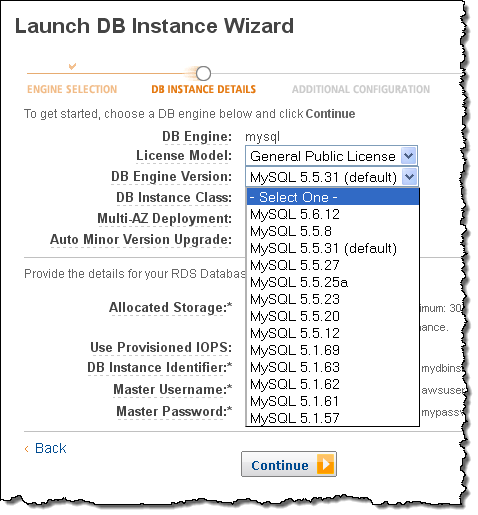
You can get started with MySQL 5.6 today by launching RDS Database Instances from the AWS Management Console:
Upgrading From MySQL 5.5
Upgrading an existing database instance from MySQL 5.5 to MySQL 5.6 is not currently supported. However, we intend to provide this functionality in the near future.
In the meantime, if you would like to port your existing MySQL 5.5 database to MySQL 5.6, you can use mysqldump to export your database from your existing MySQL 5.5 database instance and import it into a new MySQL 5.6 database instance.
For more information, visit the MySQL section of the Amazon RDS User Guide.
-- Jeff;
Amazon is often our go-to place for buying things online, but the best deals aren't always obvious. There are several ways you can save quite a bit of money when shopping on Amazon, but only if you utilize the right programs and strategies. Here's how.
Amazon doesn't conceal their outlet store outright, but most people don't know it exists. Buried within their other shopping categories, their virtual outlet shows you products discounted anywhere from 30-60% off their MSRP (manufacturer suggested retail price). If you don't want a specific item, but rather a good yet cheap TV, blender, SD card, or whatever, the outlet store will show you the biggest markdowns in pretty much any shopping category on the site.
Somewhat in conjunction with the outlet store, Amazon Warehouse Deals offers significant discounts on open box and refurbished items. All products get tested at Amazon to ensure they function. Once posted, the online retailer cautiously described the condition of the item. I've ordered quite a few items through Warehouse Deals that claimed to have cosmetic damage and found myself hard-pressed to find a single scratch. While no company dodges errors, Amazon Warehouse Deals boasts a great track record with almost two million reviews. You get to take advantage of Amazon's standard return policy, too, so if you run into a problem you can just send it back. Overall, it's a great way to save a lot of money—especially on rarely-discounted products—without the risk usually associated (or imagined) with used or refurbished gear.

You may not always find the price you want when shopping on Amazon, but with prices fluctuating daily you may get it at some point down the line. It's annoying to have to check the site for a better deal on a daily basis, so avoid all that hassle by setting up price alerts with OnlinePriceAlert. All you do is enter the URL of an Amazon item, your email address, and the target price. (You can do this through their bookmarklet, too, to avoid going directly to the site.) When the price drops to your target, you'll get an email. It's as simple as that.
S
Amazon has an affiliates program called Amazon Associates that gives you up to a 15% referral fee on any purchases people make with your affiliate links. While you can try purchasing from yourself to get an extra 15% off, Amazon tends to notice and remove your commission when they do. A better idea is to get an affiliate buddy. Basically, find another friend who shops on Amazon frequently and give them your affiliate code. Whenever they buy something, they use your code. In return, you do the same for them. This way you each get 15% back on whatever the other buys. It may not always be perfectly even, but it's a good way to generate some extra savings without cheating the system.
By the way, the easiest way to add your affiliate code is to append this to an Amazon URL: &tag=YOUR_AFFILIATE_CODE (e.g &tag=gizmodo-20)
S
Amazon has a program called Subscribe & Save that allows you to commit to purchasing an item on a regular basis and receive a discount for doing so. The discount is generally between 10% and 15%, saving you quite a bit over the course of a year. You can choose to subscribe to a product every months, every six months, or several options in between. This works for many products on the site such as batteries, shampoo, cleaners, toilet paper, and other stuff you'll need on a regular basis. You can even use it to automate your office lunches. It's delivered to your home when you need it and you don't pay for shipping. You save money and it's really, really convenient.
But what if you don't want to actually subscribe to a product? It doesn't really matter. If you buy something via Subscribe & Save and you don't want to continue your subscription, you can just cancel it. Amazon will even remind you a new shipment is coming so you cancel it before they bill you. You make absolutely no commitment to the program by choosing a product, and you can skip any shipments if you don't need it. Amazon just gives you the discount on any Subscribe & Save shipment, whether or not you actually use that subscription. So if you want 10-15% off, just buy the first subscription. You can just cancel it afterwards if you don't want more.
S
Amazon offers a one month free trial of their Prime service, which includes free two-day shipping, discounted overnight and Saturday, and a bunch of other benefits. If you don't want to actually pay for the service, you can get a month for free. Just pick that month strategically. For example, pick December or November for fast, free holiday shipping. One important thing to remember is that you can get another free Amazon Prime trial every 13 months. If you always want to get free shipping during the holiday season, just stagger your free trials around that time period so you can utilize the free shipping. Personally, I think Amazon Prime is a service worth paying for, but if you don't shop a lot on Amazon it might not be as worthwhile to you. If that's the case, just use the Prime trial to your advantage and reap its benefits for free when you need them most.
S
We love student discounts—forever. Amazon decided to join in on the fun with a program called Amazon Student. Not only can you can get free Amazon Prime for six months as part of the program, but exclusive deals and promotions. Definitely sign up for the program when you're headed off to college. It's a good way to save money when stocking up on dorm supplies.
Although not as much, moms get discounts too. If you need some diapers at 20% off, sign up for the program.

Amazon has two particularly useful daily deals: the Free App of the Day (Android) and the Kindle Daily Deal. To promote their app store, Amazon chooses one premium app to offer for free every day. The Kindle Daily Deal is similar, providing one heavily discounted book on a daily basis. If you have an Android device, the free app space is definitely worth watching. If you enjoy reading on an electronic device of some kind (as Kindle apps are available for practically everything), you'll also want to check the Kindle deals as well.
Photo by Vakhrushev Pavel (Shutterstock).
We've mentioned Amazon.com's Subscribe and Save program before. It's a great way to save money on items that you routinely buy, saving … Read…
Sales be damned, nothing saves you money like an old fashioned student discount. Here's how to continue making use of those golden markdowns… Read…
Jonathan Block, CTO at RockThePost.com, a crowdfunding company, has written a nice set of tips for smaller sites on how to scale a service on EC2 using a small two person development team.
Their service has a typical small scale structure:
The very sensible tips that can handle 30,000 concurrent users per web server:
There has been a lot of speculation and assumptions around whether PRISM exists and if it is cost effective. I don't know whether it exists or not, but I can tell you if it could be built.
Short answer: It can.
If you believe it would be impossible for someone with access to a social "datapool" to find out more about you (if they really want to track you down) in the tsunami of data, you need to think again.
Devices, apps and websites are transmitting data. Lots of data. The questions are could the data compiled and searched and how costly would it be to search for your targeted data. (hint: It is not $4.56 trillion).
Let's experiment and try to build PRISM by ourselves with a few assumptions:
Today on Talk Mobile the topic is social network privacy, with a particular emphasis on Facebook and employers. The question of the week is whether or not your employer should be entitled to ask for your Facebook password. Most of us will most likely say absolutely not.
That doesn't mean they can't snoop anything you haven't made private or available to only friends. That's why it's a good idea to check your Facebook privacy settings now and again. You can even do it right from the Facebook app for iPhone and iPad. Here's how:
If you'd like to change who can see what you post to Facebook for everything you may post from the Facebook app, follow these directions:

Facebook also allows you to change settings on a per post basis for when you'd like to share certain things publicly and other things privately. Doing this will only override your privacy settings on that particular post but keep the default settings for everything else.
Our recommendation is to set default privacy settings to friends only at the bare minimum and then adjust for public posts on an as needed basis when you need to.
How do you have your Facebook privacy settings configured? Let us know in the comments and make sure you jump in the conversation on Facebook and privacy over on Talk Mobile as well!